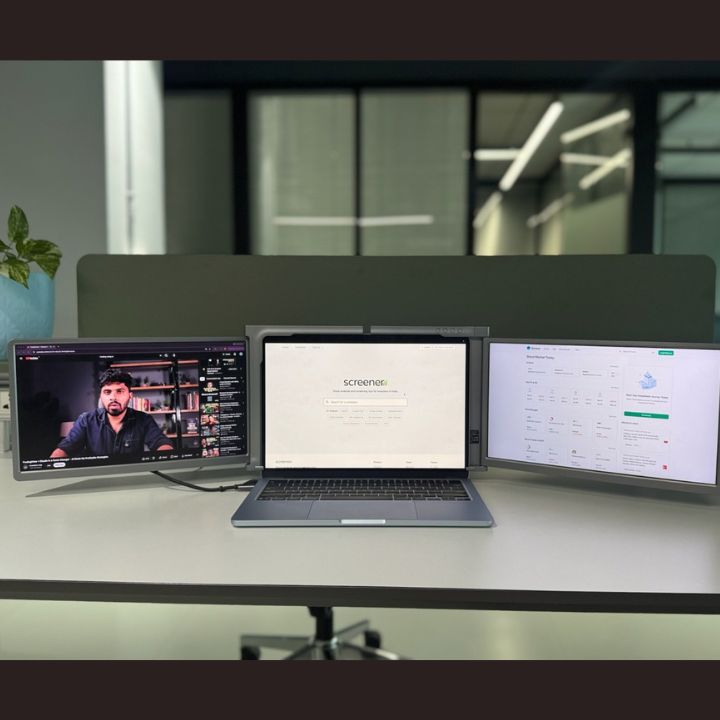

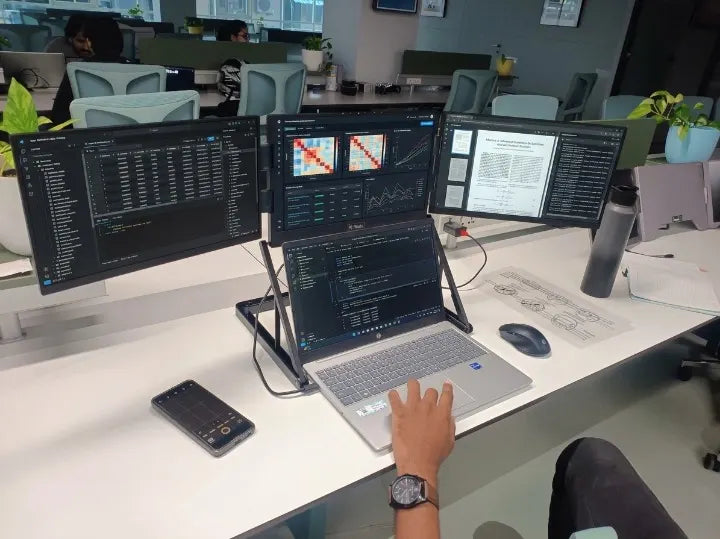
Data analysis and research often involve working with multiple applications, spreadsheets, reports, datasets, and reference materials at the same time. Switching between these windows repeatedly can interrupt your workflow and make it harder to compare information efficiently. A well-organized four screen setup for data analysis can help you keep important information visible and structure your workspace around the way you work.
Whether you are a data analyst, researcher, financial professional, student, or business owner, arranging four displays strategically can make complex tasks easier to manage. The key is to assign each screen a clear purpose instead of opening applications randomly across your workspace.
Why Use a Four Screen Setup for Data Analysis?
Data analysis frequently requires comparing information from different sources. For example, you might need to examine a spreadsheet while reviewing a report, checking a dashboard, and documenting your findings.
With four displays available, you can keep these resources visible simultaneously rather than repeatedly minimizing and reopening windows.
A four-screen workstation can help you:
-
Compare datasets and reports side by side.
-
Monitor dashboards while analyzing detailed information.
-
Keep research papers and reference materials accessible.
-
Review results while documenting observations.
-
Reduce unnecessary window switching during complex tasks.
The objective is not simply to add more screens. It is to create a workspace where information is easy to access, compare, and interpret.
How to Organize Four Screens for Data Analysis
The most effective arrangement depends on your projects, software, and working habits. However, assigning a specific role to each display is a useful starting point.
1. Use the Primary Screen for Your Main Analysis
Keep your main laptop display or preferred central screen dedicated to your primary task.
This could include working with Excel spreadsheets, analyzing datasets, writing SQL queries, reviewing statistical outputs, or using data visualization software.
Keeping your primary application in a consistent position makes it easier to concentrate on the task without constantly searching for the correct window.
2. Dedicate the Second Screen to Data Sources
Use the second display for raw datasets, source documents, reference tables, or research materials.
For example, when analyzing business performance, you can keep the original sales data open on one screen while examining calculations and trends on the primary display.
This arrangement helps you compare the source information with your analysis and makes it easier to revisit important details.
3. Keep Dashboards and Visualizations on the Third Screen
The third display can be used for dashboards, charts, graphs, and reporting tools.
Researchers and analysts often need to identify patterns, compare trends, and review changes across different variables. Keeping visualizations visible alongside the underlying data makes it easier to move between detailed information and the bigger picture.
For business research, this screen could show performance indicators or reporting dashboards. For academic work, it might display charts generated from experimental or survey data.
4. Reserve the Fourth Screen for Research and Documentation
Use the fourth display for supporting information, including research papers, browser tabs, notes, communication tools, or report drafts.
For example, a researcher could keep a reference paper open while recording observations on the main screen and comparing results on another display.
This separation helps keep supporting materials accessible without allowing them to take over the primary analysis workspace.
Tip: These roles are flexible. If your work involves programming, you might dedicate one display to code, another to output, and the remaining screens to documentation and datasets.
Four Screen Setup for Data Analysis: Examples for Different Workflows
A four-display arrangement can support different types of analytical work. Consider these examples when planning your own workspace.
For Excel and Spreadsheet Analysis
-
Screen 1: Main spreadsheet and calculations.
-
Screen 2: Source data and reference tables.
-
Screen 3: Charts, pivot tables, and dashboards.
-
Screen 4: Reports, notes, and supporting documents.
This arrangement helps you compare source information, calculations, and results without repeatedly switching windows.
For SQL and Data Analytics
-
Screen 1: SQL editor or analysis environment.
-
Screen 2: Database schema and documentation.
-
Screen 3: Query results and visualizations.
-
Screen 4: Project requirements, notes, or reference materials.
Keeping these resources visible can make it easier to follow the relationship between queries, outputs, and project requirements.
For Academic and Scientific Research
-
Screen 1: Main analysis or writing application.
-
Screen 2: Research papers and reference sources.
-
Screen 3: Data tables, charts, or experimental results.
-
Screen 4: Literature review notes and research documentation.
This approach is particularly useful when a project requires reviewing several sources and recording findings at the same time.
What to Consider When Choosing a Four-Screen Workspace
Before setting up multiple displays, consider the following factors.
Screen Size and Resolution
Choose displays that provide enough room to read tables, documents, and charts comfortably. Full HD resolution of 1920 × 1080 is suitable for many everyday analytical workflows, although your ideal configuration depends on the applications and level of detail involved.
Laptop Compatibility and Connectivity
Check your laptop's supported ports, video output capabilities, operating system, and power requirements before purchasing a multi-screen monitor. A compatible USB-C port and cable configuration can simplify connections, but not every USB-C port supports video output.
Also, confirm the product's setup requirements and operating system compatibility before connecting additional displays.
Viewing Angles and Ergonomics
Position frequently used displays close to your natural line of sight. Keep less frequently referenced information on the side or upper screens, and adjust their angles to reduce awkward head movements.
Maintain a comfortable viewing distance and take regular breaks during long analysis sessions.
Portability and Workspace Flexibility
If you work between an office, home, and different research locations, a portable monitor setup can offer more flexibility than a permanent desktop arrangement. Consider the equipment's folded dimensions, weight, stand, and setup requirements when deciding which solution suits your workflow.
How a Quad Portable Monitor Can Support Data Analysis
A quad portable monitor can help turn a compatible laptop into a more flexible multi-display workstation. Instead of purchasing and arranging several separate desktop monitors, you can use a laptop-based setup designed to provide additional displays in a compact configuration.
The RIITEK 15.6-inch Quad Portable Monitor adds three 15.6-inch Full HD IPS displays to a compatible laptop, creating a four-screen workspace when used with the laptop's own display. It features 1920 × 1080 resolution on each additional screen, a metal frame, adjustable stand, and foldable screens.
For data analysts and researchers, this configuration offers space to arrange spreadsheets, dashboards, reference documents, and reports according to their workflow. Its adjustable viewing angles also allow users to position the displays to suit their working environment.
Before choosing this setup, confirm that your laptop falls within the supported 12–18.5-inch size range and meets the monitor's connectivity and power requirements.
You can explore the RIITEK 15.6-inch Quad Portable Monitor to review its features and compatibility details.
Tips for Maintaining an Efficient Multi-Screen Workflow
Adding more displays is most useful when your workspace remains organized. Follow these practices to keep your setup manageable:
-
Assign consistent roles: Keep frequently used applications in familiar positions.
-
Group related information: Place source data near the charts or calculations derived from it.
-
Avoid unnecessary clutter: Close applications and documents that are not relevant to your current task.
-
Use readable settings: Adjust text scaling, brightness, and display resolution for comfortable viewing.
-
Protect your data: Follow your organization's security requirements when working with confidential research or business information.
-
Review your arrangement: Change screen assignments when your project or analysis requirements change.
A thoughtful arrangement can make your workspace easier to navigate without adding unnecessary complexity.
Frequently Asked Questions
1. Is a four-screen setup useful for data analysis?
Yes. A four-screen setup can help analysts view datasets, dashboards, reports, and reference documents simultaneously. Its usefulness depends on the type of analysis and how effectively the displays are organized.
2. How should I arrange four screens for research?
Start by assigning one screen to your main research task, another to source data, a third to charts or results, and the fourth to references and documentation. Adjust the arrangement according to your software and project requirements.
3. Can I use a quad portable monitor with my laptop?
Yes, provided your laptop meets the monitor's compatibility and connectivity requirements. Check the supported laptop size, ports, operating system, and power requirements before purchasing.
4. What resolution is suitable for data analysis?
Full HD resolution (1920 × 1080) is adequate for many spreadsheet, dashboard, and research tasks. More demanding workflows may benefit from higher resolutions, depending on the software and the level of detail required.
5. Is a quad portable monitor suitable for remote research?
A portable quad monitor can be useful for researchers who need multiple applications visible while working in different locations. Its practicality depends on portability, available desk space, laptop compatibility, and power requirements.
Conclusion
A well-organized four-screen setup for data analysis can make it easier to compare datasets, monitor dashboards, review research materials, and prepare reports without constantly switching between windows. Choosing the right display arrangement depends on your workflow, available desk space, and laptop compatibility.
Explore the quad portable monitor collection to find a display setup that suits your needs. You can also visit Riitek to explore the available display solutions or Contact the Riitek team for assistance in choosing a suitable setup.