

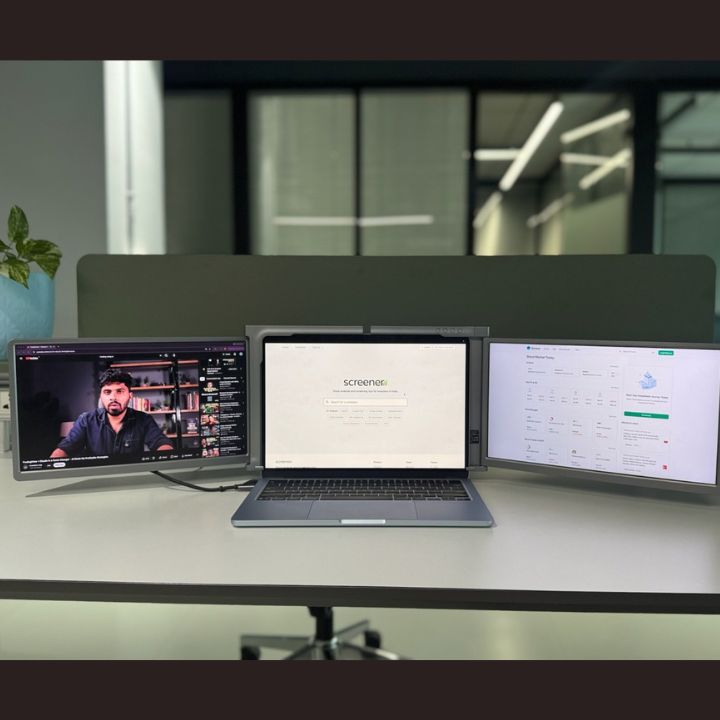
A three screen laptop setup can make daily work easier by providing more space for multiple applications. However, a dual monitor setup also offers several advantages for professionals, students, and remote workers.
Today, many people use multiple displays for coding, trading, designing, and office work. As a result, choosing the right monitor configuration has become more important.
Both setups help users organize their work. However, they differ in screen space, portability, flexibility, and cost.
In this guide, we compare both options to help you choose the right display solution. We also explore how RIITEK offers portable screen extenders for flexible multitasking.
What Is a Three Screen Laptop Setup?
A three screen laptop setup combines your laptop's built-in display with two additional monitors. Therefore, you can manage multiple applications across three separate screens.
For example, you can organize your workspace as follows:
-
First screen: Main project or working application.
-
Second screen: Research, reference files, or spreadsheets.
-
Third screen: Emails, meetings, or communication tools.
This arrangement helps reduce unnecessary window switching. Moreover, it keeps important information visible while you work.
A portable laptop screen extender makes this configuration more convenient. Instead of carrying two separate desktop monitors, you can use a compact, foldable display solution.
What Is a Dual Monitor Setup?
A dual monitor setup uses two displays to expand your workspace. Usually, it combines a laptop screen with one external monitor.
This configuration works well for everyday tasks. For example, you can write a report on one screen while reviewing research on another.
Additionally, dual monitors are useful for online meetings, document editing, and general office work.
However, professionals who frequently manage several applications may need additional display space. In such situations, a third screen can offer greater flexibility.
Three Screen Laptop Setup vs Dual Monitor: Key Differences
Both configurations support multitasking. However, their features and practical benefits differ.
| Feature | Three Screen Laptop Setup | Dual Monitor Setup |
|---|---|---|
| Number of displays | Three | Two |
| Multitasking | More applications visible | Suitable for basic multitasking |
| Workspace | Additional screen space | Moderate screen space |
| Portability | High with portable extenders | Depends on monitor type |
| Desk space | Compact with laptop extenders | Depends on monitor size |
| Setup | Requires compatible hardware | Often simpler |
| Best for | Coding, trading, and complex tasks | Office work and everyday use |
| Budget | Generally higher for comparable displays | Often more affordable |
Ultimately, the right choice depends on your daily requirements. Three screens provide more workspace, while dual monitors offer a simpler arrangement.
Benefits of a Three Screen Laptop Setup for Productivity
1. Manage Multiple Applications Easily
A three screen laptop setup allows users to view several applications simultaneously.
For example, you can keep a spreadsheet open while checking emails and reviewing documents.
As a result, you spend less time switching between windows. Furthermore, you can organize applications based on your daily workflow.
2. Improve Your Coding Workspace
Programmers often use several development tools at once. These include code editors, debugging tools, browsers, and documentation.
With three screens, developers can distribute these applications across separate displays.
For instance, you can keep your code editor on the main screen. Meanwhile, the other displays can show documentation and testing results.
This organized layout makes important information easier to access during development.
3. Create a Flexible Trading Workspace
Stock traders regularly monitor charts, market updates, and trading platforms.
Therefore, additional screens can help them view important information simultaneously.
For example, traders can display charts on one screen and financial news on another. Meanwhile, the primary screen can show their trading platform.
Although extra displays cannot guarantee better trading results, they can make market information easier to organize.
4. Support Remote Work and Online Meetings
Remote professionals often manage video calls, documents, and emails throughout the day.
A portable triple-screen workstation helps keep these applications visible.
For example, you can attend a video conference while reviewing documents and taking notes.
Additionally, a foldable screen extender allows users to move between suitable workspaces more conveniently.
Advantages of a Dual Monitor Setup
Although three screens provide additional workspace, dual monitors remain useful for many users.
1. Affordable Display Expansion
A dual monitor setup often costs less than adding two external displays.
Therefore, it can be a practical choice for students and professionals with limited budgets.
2. Simple Workspace Organization
Two screens provide enough space for many everyday activities.
For example, office workers can manage documents and emails without constantly switching between applications.
3. Suitable for Basic Multitasking
Not everyone needs three displays.
If your daily work involves only two main applications, a dual monitor setup may provide sufficient workspace.
Moreover, one large external monitor can be useful for tasks that benefit from a bigger viewing area.
Why Choose the RIITEK 13.3-Inch Tri Portable Monitor?
A three screen laptop setup becomes easier with the RIITEK 13.3-inch Tri Portable Monitor. It adds two 13.3-inch Full HD IPS displays to your laptop, creating a flexible workspace for multitasking.
The monitor features 1920 × 1080 resolution, a 60Hz refresh rate, and adjustable screens for comfortable viewing. Moreover, its foldable design makes it convenient for office work, coding, trading, and travel.
Additionally, the USB-based connection eliminates the need for an HDMI cable. However, driver installation may be required depending on your laptop.
Why Choose a Portable Triple Screen Laptop Monitor?
A portable triple screen laptop monitor offers a convenient way to expand a compatible laptop into a three-screen workstation.
Unlike traditional desktop monitors, these extenders combine two additional displays in a compact, foldable design.
The RIITEK 13.3-inch Tri Portable Monitor is designed for users who want additional screen space without relying on a permanent desktop arrangement.
Full HD Displays for Clear Visuals
The monitor features two 13.3-inch Full HD IPS screens with a resolution of 1920 × 1080 pixels.
The displays also support a 60Hz refresh rate and a 16:9 aspect ratio.
Therefore, users can view documents, charts, coding tools, and everyday applications across separate screens.
Compact and Foldable Design
Portability is another important advantage of a laptop screen extender.
The foldable design makes the additional displays easier to carry between locations.
As a result, professionals can create an expanded workspace at home, in the office, or during business travel.
Convenient USB Connectivity
The 13.3-inch Tri Portable Monitor uses USB-based connectivity with compatible laptops.
Its connection system does not require an HDMI cable. However, supported USB connections and driver requirements depend on the laptop model.
Therefore, users should check compatibility before purchasing.
Designed for Different Work Requirements
A portable triple-screen monitor can support several professional activities.
It is particularly useful for:
- Programmers and software developers
- Stock traders and financial professionals
- Remote workers and business owners
- Students and researchers
- Content creators and designers
You can also browse the Extendable Display Collection to discover more portable screen solutions for different work requirements.
How to Build a Three Screen Laptop Setup
Creating a three screen laptop setup requires compatible equipment and proper display settings.
Step 1: Check Your Laptop Compatibility
First, check your laptop's operating system and available ports.
Next, confirm that the selected screen extender supports your device. Some configurations may also require driver installation.
Step 2: Attach the Screen Extender
Position your laptop on a stable surface.
Then, attach the portable monitor according to the product instructions. Adjust both extended displays for comfortable viewing.
Step 3: Connect the Displays
Connect the monitor using its supported USB cable configuration.
Afterward, install any required drivers and confirm that your laptop recognizes both additional displays.
Step 4: Arrange Your Screens
On Windows, open Settings → System → Display.
On macOS, open System Settings → Displays.
Next, arrange the screens according to their physical positions. Choose extended-display mode if your device supports it.
Step 5: Organize Your Workflow
Finally, move applications across the available screens.
Keep your most important task on the main display. Meanwhile, use the other screens for supporting applications and reference materials.
Which Monitor Setup Is Best for Your Work?
Choosing the right display arrangement depends on your daily activities, budget, and workspace.
A dual monitor setup works well for basic multitasking and general office work. Additionally, it may be more affordable for users who need only one external display.
In contrast, a three screen laptop setup offers more flexibility when managing several applications.
For example, programmers, traders, and content creators may benefit from the extra workspace.
Furthermore, a portable triple-screen extender can make the setup convenient for professionals who regularly change work locations.
Therefore, consider your daily workload and portability requirements before choosing a monitor configuration.
Final Verdict: Three Screen Laptop Setup vs Dual Monitor
Both monitor configurations can improve workspace organization. However, the best option depends on how you work.
A dual monitor setup is suitable for everyday tasks and simpler workflows. On the other hand, a three screen laptop setup provides additional display space for demanding multitasking.
If you frequently use several applications, a third screen may help you create a more organized workstation.
For users who value portability, the RIITEK 13.3-inch Tri Portable Monitor offers a foldable solution with two additional Full HD displays.
Ready to expand your workspace?
Discover the benefits of a portable triple-screen workstation and find a suitable display solution for coding, trading, remote work, and daily productivity. For product information or compatibility assistance, contact our team.
Frequently Asked Questions (FAQs)
1. Is a three screen laptop setup better than a dual monitor setup?
A three screen laptop setup provides more display space for multitasking. However, a dual monitor setup may be sufficient for everyday office work. The better choice depends on your workload, budget, and available space.
2. Can I connect three screens to one laptop?
Yes, many laptops support three-screen configurations, including the built-in display. However, compatibility depends on the laptop hardware, operating system, connection method, and required drivers.
3. Is a three screen laptop setup useful for coding?
Yes. Programmers can use separate displays for coding, documentation, and testing. Consequently, they can keep important development tools visible while working.
4. Does the 13.3-inch Tri Portable Monitor require an HDMI cable?
No. This model uses USB-based connectivity instead of an HDMI cable. However, compatible ports and driver requirements vary by laptop. Therefore, users should confirm compatibility before purchasing.
5. Is a portable triple-screen monitor good for remote work?
Yes. A portable triple-screen monitor offers additional workspace for meetings, documents, and communication tools. Moreover, its foldable design makes it convenient for professionals who work from different locations.


