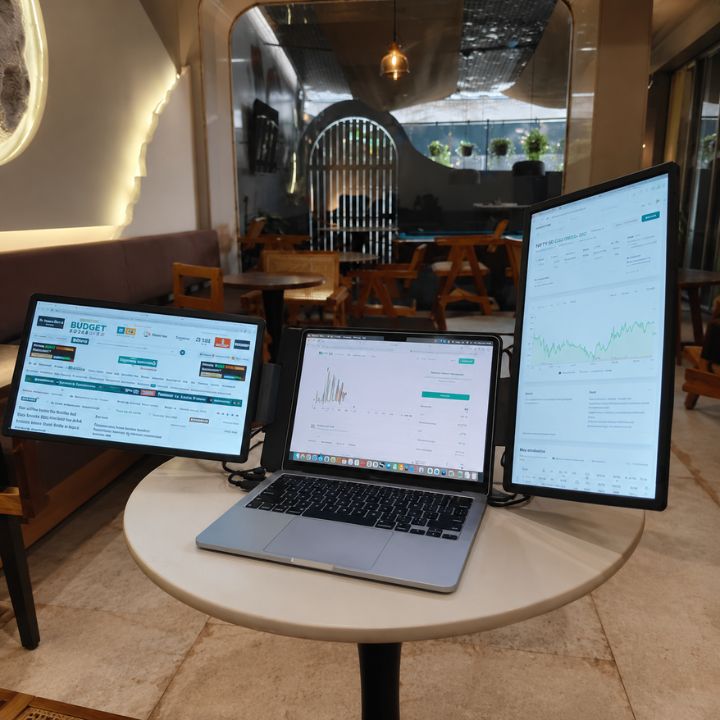


Working on a laptop gives you flexibility, but a single screen can quickly feel limiting when you are managing multiple applications, documents, meetings, charts, or creative tools. Adding a touch screen monitor for laptop can give you more room to work while keeping your setup portable and easy to manage.
The RIITEK 15.6" Touchscreen Portable Full HD Monitor is designed for professionals, students, traders, developers, creators, and anyone who needs an additional interactive display. It combines a 15.6-inch Full HD IPS screen, 10-point capacitive touch, USB-C and HDMI connectivity, and a lightweight portable design.
Explore the RIITEK 15.6" Touchscreen Portable Monitor to view complete product details, specifications, and compatibility information.
Why Add a Touch Screen Monitor for Laptop?
A second display can make multitasking much easier. Instead of constantly switching between tabs and applications, you can keep different tasks visible at the same time.
For example, you can use your laptop screen for your main work while keeping emails, documents, meetings, dashboards, or reference material open on the additional display.
A portable touchscreen monitor provides another advantage: direct interaction. On compatible systems, you can tap, scroll, select, and control supported applications using the screen itself.
This makes your workspace more flexible without requiring a large permanent desktop setup.
Enjoy a Clear 15.6 Inch Full HD Display
The monitor features a 15.6-inch IPS display with 1920 × 1080 Full HD resolution, providing clear visuals for everyday work and entertainment.
Whether you're viewing spreadsheets, charts, videos, documents, presentations, or code, the larger screen gives you additional space for everyday tasks.
The IPS panel also makes this 15.6 inch touchscreen monitor suitable for work, entertainment, presentations, and general productivity.
Responsive 10-Point Touch Control
One of the key features of this monitor is its 10-point capacitive touchscreen.
On compatible devices and operating systems, the touchscreen lets you interact directly with your applications rather than relying completely on a mouse or trackpad.
This can be useful for:
- Navigating applications
- Reviewing documents
- Managing dashboards
- Browsing websites
- Working with creative tools
- Presenting information
- Controlling compatible software
Touch functionality can vary depending on the connected device, operating system, software, and connection method.
Create a More Productive Dual-Screen Setup
Using a second screen for laptop work can help organize your workspace more effectively.
You can keep one application on your primary laptop display and move supporting content to the portable monitor.
For developers: Keep your code editor on one screen and documentation, browser windows, terminals, or debugging tools on the other.
For traders: Display charts, market data, news, or analytical tools separately.
For business professionals: Keep presentations, spreadsheets, emails, video meetings, and reports visible simultaneously.
For students: Use one screen for online classes while keeping notes or research material open on the second display.
For creators: Separate editing tools, timelines, references, or preview windows for a more organized workspace.
The additional display space can reduce unnecessary window switching and make everyday multitasking more convenient.
Simple USB-C and HDMI Connectivity
Connectivity is an important consideration when choosing an external touchscreen monitor.
The 15.6-inch display supports USB-C and HDMI connectivity, providing flexible options for compatible laptops and other devices.
Single-Cable USB-C Setup
If your laptop supports full-function USB-C or DisplayPort Alt Mode and provides sufficient power, a compatible USB-C connection can carry video and power through one cable.
This creates a cleaner workspace with fewer cables and makes a USB-C portable monitor especially convenient for mobile professionals.
HDMI + USB Setup
If your laptop does not support USB-C video output, HDMI can be used for video while USB provides the required power.
This gives users more flexibility when connecting different laptops, desktops, and compatible devices.
Portable Monitor for Laptop Users Who Work Anywhere
Unlike a traditional desktop monitor, a portable monitor for laptop can move with you.
Its lightweight design makes it practical for people who regularly move between home, office, meetings, coworking spaces, client locations, or travel destinations.
Instead of building a permanent multi-monitor workstation, you can carry an additional Full HD display alongside your laptop.
This is especially helpful for remote workers, business travellers, freelancers, consultants, and students.
RIITEK focuses on portable display solutions designed to help users expand their workspace while maintaining flexibility and portability.
A Flexible Monitor for Work and Entertainment
A portable display is not limited to office productivity.
Depending on the connectivity and display-output support of your device, it can also be useful with compatible smartphones, gaming systems, and other devices.
That means the same monitor can support different activities, including:
- Office work
- Remote working
- Coding
- Trading
- Studying
- Presentations
- Content consumption
- Gaming
- Travel setups
This flexibility makes it useful for users who want one additional display for multiple purposes.
For more information about practical applications, setup recommendations, and touchscreen display benefits, read our guide on Touchscreen Portable Monitor for Work: Benefits, Uses & Setup Tips.
Important Touchscreen Compatibility Information
Before purchasing any touchscreen external display, it is important to check how your operating system and device handle touch input.
Touch functionality may vary depending on:
- Operating system
- Laptop or device model
- USB-C capabilities
- Connection method
- Software compatibility
For this reason, users who specifically require touchscreen functionality should verify compatibility before selecting their setup.
Why Choose a USB-C Portable Monitor?
A USB-C portable monitor can simplify your workstation when your laptop supports video output through USB-C.
Instead of using multiple connections for video and power, compatible devices may support a simpler single-cable setup.
This is especially useful when:
- Working from a small desk
- Travelling with your laptop
- Moving between office and home
- Attending meetings
- Working from coworking spaces
- Setting up temporary workstations
For laptops without compatible USB-C video output, HDMI provides an alternative connection option.
Touch Screen Monitor for Laptop Professionals
A touch screen monitor for laptop can be particularly useful for professionals who regularly work with multiple applications and need more screen space to stay organized. Sales professionals can keep CRM information open on one display while communicating with customers on the other, while developers can separate code from documentation, browsers, or debugging tools. Traders can monitor additional charts and market information, designers can keep references and supporting tools visible, and remote workers can attend video meetings while accessing documents or notes at the same time. The main benefit is not simply having a larger screen, but having more usable workspace available whenever you need it. RIITEK portable displays are designed to support flexible multi-screen workspaces without requiring a permanent traditional desktop monitor setup.
Why a Second Screen Can Improve Everyday Productivity
One of the biggest challenges of working from a laptop is managing several windows on one relatively small display.
Think about a typical workday. You may have a browser open for research, a spreadsheet for data, email for communication, a video meeting running, and another application containing your main work.
With only one screen, you often have to minimize, resize, and switch between applications adding a second screen for laptop use allows you to divide those tasks across separate displays.
For example:
Main Laptop Screen: Your primary application or project.
Portable Display: Email, research, communication tools, documents, charts, or reference material.
This simple arrangement can make your workspace feel much more organized.
Portable Monitor for Coding and Development
Developers often work with several tools simultaneously.
A typical coding workflow might involve:
- Code editor
- Browser
- Terminal
- Documentation
- Debugging tools
- Communication applications
With a portable second screen, documentation or browser output can stay visible while code remains on the laptop display. This can reduce unnecessary switching between windows and provide a more comfortable development environment, especially when working away from a permanent desktop setup.
Useful for Traders and Financial Professionals
Trading is another workflow where additional screen space can be particularly valuable.
Traders often need to view:
- Market charts
- Order windows
- News feeds
- Watchlists
- Indicators
- Research
- Communication tools
A 15.6 inch touchscreen monitor can provide additional room for charts and supporting information while keeping the main trading application on the laptop display.
The portable form factor can also help users who want a multi-screen trading setup without depending on a fixed office workstation.
Portable Monitor for Students and Online Learning
Students increasingly use laptops for online classes, assignments, research, presentations, and collaborative projects. A portable monitor gives them extra screen space while remaining lightweight and easy to carry between home, college, libraries, or study spaces.
Setup is also simple, with compatible USB-C or HDMI connections allowing students to quickly add a second display to their laptop. They can keep an online lecture on one screen while taking notes on the other, or view research material while working on assignments without constantly switching between tabs.
Portable Display for Business and Presentations
Business professionals can also use an external touchscreen monitor during meetings or presentations.
An additional display can be useful when reviewing:
- Sales reports
- Presentations
- Product information
- Documents
- Dashboards
- Customer information
- Project plans
A portable display provides the advantage of having additional screen space without depending on the availability of a desktop monitor at every location.
Portable Touchscreen Monitor for Hybrid Work
Hybrid work means professionals often switch between home, office, coworking spaces, and other locations. While a traditional dual-monitor setup works well at a fixed desk, it becomes less practical when you need to move frequently. A portable touchscreen monitor gives you the flexibility to maintain a productive dual-screen setup without carrying bulky equipment.
You can use it at home, carry it to the office, and take it while travelling. With its lightweight design and easy USB-C or HDMI setup, a portable display helps you create a consistent and organized workspace wherever you work. Upgrade your hybrid workspace with the RIITEK 15.6" Touchscreen Portable Monitor and enjoy the freedom of a dual-screen setup wherever your work takes you.
What to Check Before Buying a Portable Touchscreen Monitor
Before choosing any portable monitor, check a few important factors.
1. Laptop Ports
Check whether your laptop has USB-C with video output, HDMI, or another compatible display connection.
2. USB-C Capability
Not every USB-C port supports video. Look for DisplayPort Alt Mode or Thunderbolt support if you want to use USB-C for display output.
3. Touch Compatibility
Touch controls depend on both hardware and operating-system support.
4. Screen Size
A 15.6-inch display offers a balance between usable workspace and portability.
5. Resolution
Full HD resolution is suitable for many productivity, study, entertainment, and business applications.
6. Portability
Consider the monitor's dimensions and weight if you plan to carry it regularly.
Checking these factors will help you choose a portable display that matches your workflow.
Is a 15.6 Inch Touchscreen Monitor Worth It?
If you regularly feel restricted by a single laptop display, an additional portable monitor can be a practical upgrade.
It can be particularly useful if you want:
- More screen space
- A portable dual-screen workspace
- Touch interaction on compatible devices
- USB-C or HDMI connectivity
- A display suitable for travel
- A monitor for both productivity and entertainment
For users who work across several locations, a portable monitor provides a convenient alternative to maintaining multiple desktop monitors.
Final Thoughts
Upgrading your laptop setup does not require a large desk or a complicated permanent workstation.
A touch screen monitor for laptop gives you additional screen space while maintaining the portability that makes laptops convenient in the first place.
Whether you're coding, trading, studying, designing, attending meetings, travelling, or working remotely, a second portable display can create a more organized and flexible workspace.
RIITEK offers portable display solutions for users who want to expand their laptop setup and work efficiently across different environments.
Need help choosing the right monitor or checking whether your device supports touchscreen functionality? Contact RIITEK for product recommendations, compatibility guidance, and setup assistance.