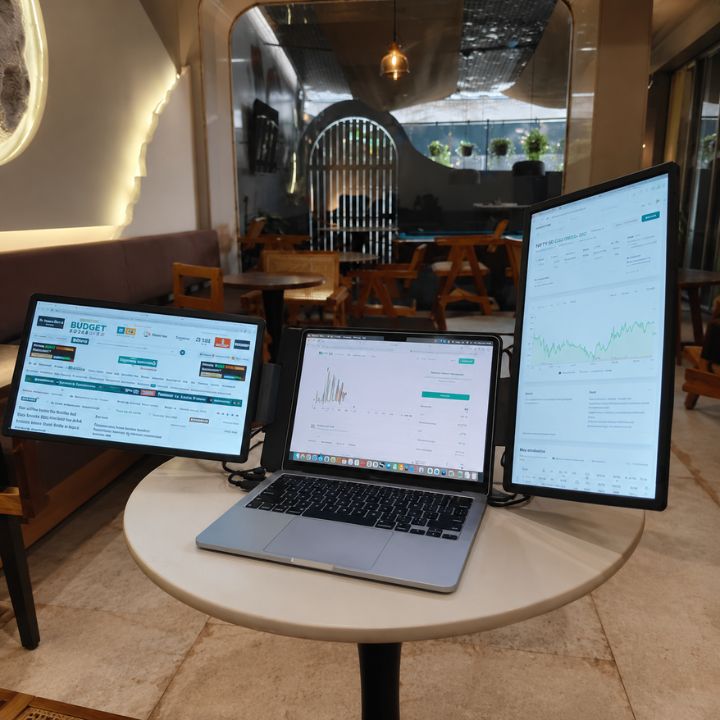

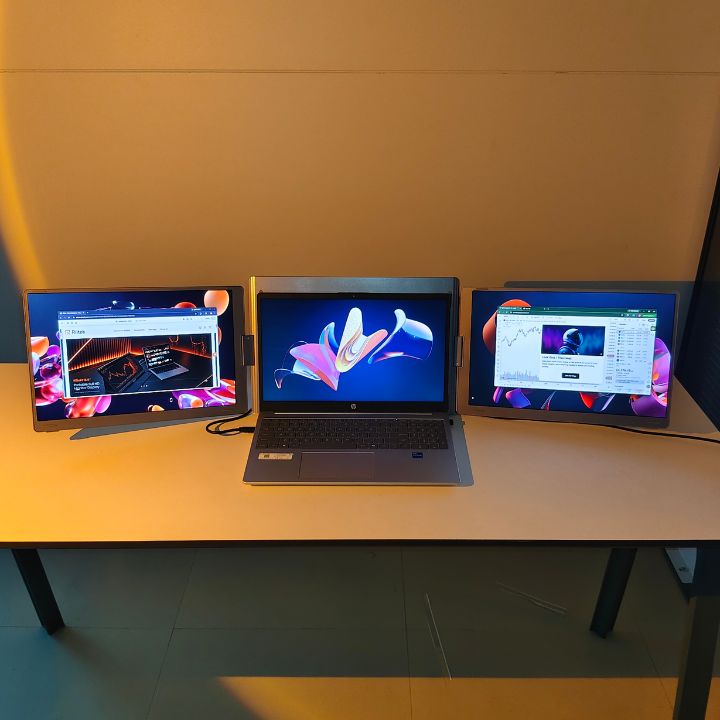
A tri monitor for laptop can provide the extra screen space needed to manage several applications, documents, browser tabs, and communication tools more efficiently. A three-screen workspace can reduce unnecessary window switching and make multitasking more convenient.
With three screen displays available, you can keep different applications visible at the same time. This makes it easier to organize your workflow and access important information without constantly moving between windows.
This type of setup can be useful for professionals, traders, developers, designers, content creators, researchers, and remote workers who need a flexible workstation.
What Is a Tri Monitor for Laptop?
A tri monitor for laptop is a portable multi-screen display solution designed to expand your laptop's workspace. It works alongside your laptop's built-in display to provide additional screens for multitasking.
Instead of keeping several applications on one display, you can distribute them across multiple screens. For example, you can keep your main project on one display, research on another, and communication tools on the third.
A portable three-screen solution can also be useful for people who work from different locations and need additional workspace without installing permanent desktop monitors.
Benefits of a Triple Monitor Setup for Laptop
A triple monitor setup for laptop gives you more workspace for managing multiple tasks.
Keep Multiple Applications Visible
Additional displays allow you to keep different applications open simultaneously. You can work on a document while keeping reference information, emails, or browser windows visible.
Reduce Window Switching
Moving between multiple windows can interrupt your workflow. With more screen space, frequently used applications can remain visible while you work.
Organize Your Workspace
A three-screen workspace allows you to assign different tasks to different displays. This can create a more organized working environment for complex workflows.
Support Better Multitasking
If your work requires monitoring several sources of information, additional displays can make it easier to view everything at once.
How a Laptop Screen Extender Triple Monitor Setup Works
A display extension guide triple monitor setup adds external displays to your laptop through supported connections.
Before connecting a portable display, check your laptop's available ports, operating system, display support, and power requirements. Compatibility can vary between different laptop models.
Once the displays are connected correctly, supported operating systems can allow you to extend your desktop across multiple screens. You can then move applications and windows between displays according to your workflow.
3 Screen Laptop Setup for Different Workstyles
A 3 screen laptop setup can be useful for a wide range of professional tasks. With RIITEK portable display solutions, users can expand their laptop workspace and keep multiple applications visible for more efficient multitasking.
Trading and Financial Analysis
Traders can use multiple displays to view charts, market data, news, watchlists, and trading platforms. Keeping important information visible can make monitoring several data sources more convenient.
Programming and Development
Developers can dedicate one display to their code editor, another to documentation or browser windows, and another to terminals, testing tools, or communication applications.
Office and Business Work
Professionals can keep spreadsheets, emails, presentations, project management tools, and communication applications visible at the same time.
This can be especially helpful when working with large amounts of information throughout the day.
Design and Creative Work
Designers and content creators can use additional screens for reference material, editing tools, timelines, asset libraries, or other supporting applications.
Remote Work
Remote workers can create a larger digital workspace without purchasing several traditional desktop monitors. A portable setup can also be useful when working from home, an office, or another location.
If you are comparing different display expansion options, explore the Extendable Display Collection to see available solutions.
What to Look for in a Triple Laptop Screen Extender
Choosing the right triple laptop screen extender requires more than simply looking at the number of displays.
Display Quality
Consider resolution, colour coverage, brightness, and viewing quality. Clear displays are useful for documents, charts, creative applications, and everyday productivity.
Laptop Compatibility
Compatibility is one of the most important factors. Check your laptop model, operating system, supported display connections, and power requirements before purchasing.
Portability
If you regularly move between locations, a foldable and portable design can make your additional screens easier to carry and store.
Viewing Flexibility
Adjustable displays allow you to position the screens according to your desk setup and preferred viewing angle.
Connection Requirements
Check which ports and cables are required by the specific monitor. Your laptop should meet the product's connection and power requirements for the intended setup.
Tri Screen Laptop Monitor Extender for Productivity
A tri screen laptop monitor extender can be useful when your workflow involves several applications at once.
Instead of placing multiple full-size monitors on your desk, a portable multi-screen solution can expand your laptop workspace while maintaining a more compact setup.
For example, you could use one display for your primary task, another for research or data, and another for communication or monitoring.
This arrangement can make it easier to manage different tasks without repeatedly minimizing and reopening applications.
Why Choose the RIITEK Tri-16?
The RIITEK Tri-16 is designed for users who want to expand their laptop workspace with additional displays.
It features two additional 16-inch IPS screens, creating a three-screen workspace when used with your laptop display. The displays provide 1920 × 1200 resolution, a 16:10 aspect ratio, and 100% sRGB colour coverage.
The setup is designed for productivity-focused workflows such as office work, trading, coding, research, content creation, and multitasking.
Its foldable design also makes it suitable for users who need additional screen space while working in different locations.
You can explore the RIITEK Tri-16 to view the product details and check whether it suits your laptop setup.
Is a Tri Monitor Setup Worth It?
A three-screen setup can be useful if your daily workflow involves multiple applications, documents, or information sources.
Additional screen space can help you keep important windows visible, reduce unnecessary window switching, and organize different tasks across separate displays.
However, the right setup depends on your laptop's compatibility, workspace, portability requirements, and the applications you use.
For professionals who regularly multitask, a portable three-screen workspace can provide a flexible alternative to using several traditional desktop monitors. RIITEK offers portable display solutions designed to help users expand their laptop workspace.
Conclusion
A tri monitor for laptop can expand your digital workspace and provide a more organized environment for multitasking.
Whether you manage trading charts, write code, work with spreadsheets, create content, or handle remote projects, additional screens can help keep important information visible while you work.
A portable three-screen solution provides flexibility for users who need more workspace without relying on several traditional desktop monitors.
If you need help choosing a compatible screen extender or want more information about the Tri-16, Contact RIITEK for product information, compatibility guidance, and assistance.
Frequently Asked Questions
What is a tri monitor for laptop?
A tri monitor for laptop is a multi-display solution that adds two external screens to your laptop, allowing you to work across a three-screen workspace.
Can I use a tri monitor with my laptop?
Compatibility depends on your laptop's supported ports, operating system, display capabilities, and the monitor's connection requirements. Check compatibility before purchasing.
What is a 3 screen laptop setup useful for?
A 3 screen laptop setup can be useful for trading, coding, office work, research, design, content creation, and other tasks that require multiple applications to remain visible.
Is a triple monitor setup good for productivity?
A triple-screen setup can make multitasking more convenient by allowing several applications and information sources to remain visible simultaneously.
Is the Tri-16 portable?
Yes. The Tri-16 uses a foldable design intended to make the additional displays easier to transport and use in different working environments.
What should I check before buying a laptop screen extender?
Check your laptop's model, operating system, supported display connections, power requirements, and compatibility with the specific screen extender.