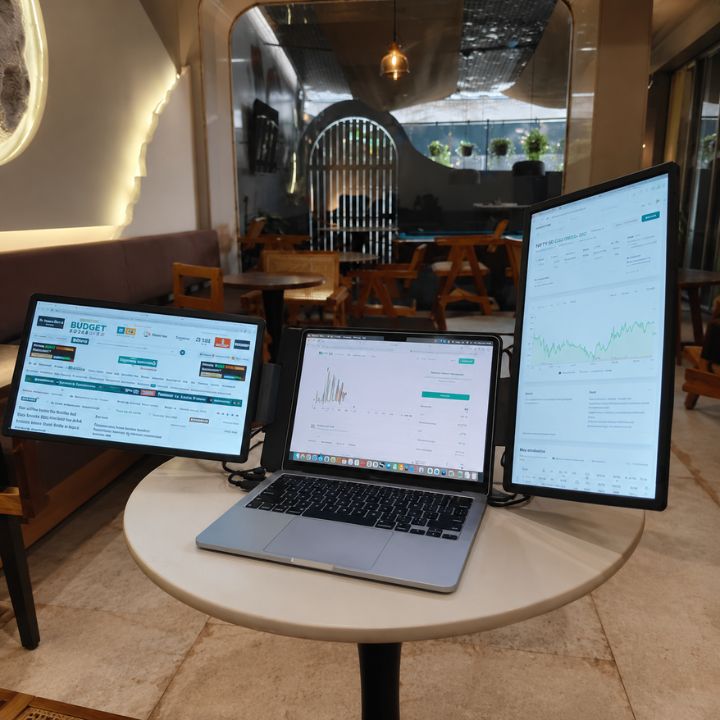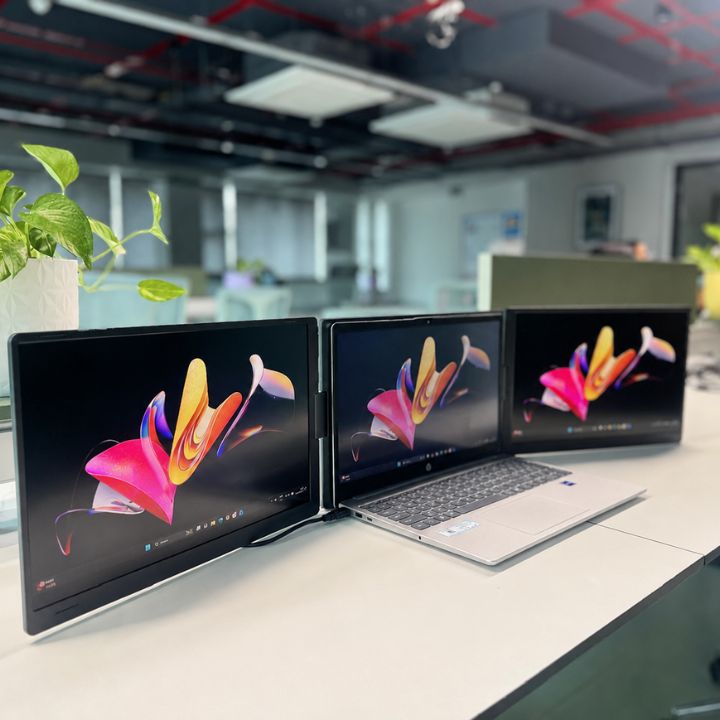


A Dual Monitor for Laptop can make coding, debugging, testing, and multitasking easier for programmers who regularly work across multiple applications. A typical development session may involve an IDE, browser, documentation, terminal, database tools, and communication apps at the same time. Having additional screen space helps developers organize these tools efficiently and reduces constant switching between windows.
For programmers looking to expand their workspace, two popular choices are a laptop-based dual-screen setup and a traditional desktop monitor. Both provide additional screen space, but they differ in portability, desk requirements, flexibility, and everyday usability.
So, which setup is better for programmers? Let’s compare them.
Why Programmers Need Multiple Screens
Programming involves much more than writing code. Developers regularly compare files, check documentation, test applications, monitor output, debug errors, and communicate with team members.
Adding a Second Monitor for Laptop makes it easier to keep important information visible while working. For example, you can keep your code editor on one screen and documentation, browser previews, terminal windows, or debugging tools on another.
A multi-screen workspace can be especially useful for web developers who need to code and preview changes simultaneously. For more ideas on building an efficient workspace, check out our dual screen monitor setup guide.
What Is a Dual Monitor for Laptop?
A Dual Monitor for Laptop adds another display to your existing laptop workspace, giving you more room to manage applications and tasks.
Unlike a traditional desktop monitor that usually remains at a fixed workstation, many laptop-focused displays are designed with portability in mind.
A Laptop Screen Extender can be particularly useful for developers who work from home, offices, coworking spaces, or while travelling. Instead of depending on a permanent workstation, you can create a more productive setup wherever you use your laptop.
RIITEK provides display solutions designed for professionals who want to expand their laptop workspace for multitasking and everyday productivity.
What Is a Traditional Desktop Monitor?
A traditional desktop monitor is an external screen designed primarily for a permanent or semi-permanent workstation.
Desktop monitors are available in many screen sizes and resolutions. A larger screen can provide plenty of room for coding environments, dashboards, browser windows, design tools, and development applications.
However, desktop monitors usually require more desk space. They may also need separate power and display cables, making them less convenient for professionals who frequently move between locations.
Dual Monitor for Laptop vs Traditional Desktop Monitor
Both options can improve a programmer's workspace, but the better choice depends on how and where you work.
1. Portability
Portability is one of the biggest differences between these setups.
A Portable Monitor for Laptop can be carried between different workspaces, making it useful for remote workers, freelancers, developers, and professionals who travel regularly.
A traditional desktop monitor is much harder to move and is generally better suited to a permanent desk.
If portability is important to your programming workflow, a laptop-focused monitor has a clear advantage.
2. Desk Space
Not every programmer has a large workstation. A desktop monitor requires sufficient space for the display and stand, while your laptop, keyboard, mouse, and other accessories also need room.
A 14 Inch Portable Monitor provides additional display space while maintaining a relatively compact workspace. This can make it a practical choice for small desks, shared offices, or temporary workstations. Developers interested in a compact setup can explore the portable monitor from RIITEK.
3. Dual Monitor for Laptop for Coding and Debugging
An additional screen can make coding and debugging more organized.
For example:
- Main screen: IDE or code editor
- Additional screen: Browser preview
- Documentation visible while coding
- Terminal or logs open separately
- Communication tools available without covering your code
A Dual Screen Monitor for Laptop allows developers to distribute their applications across multiple displays instead of repeatedly opening, minimizing, and switching between windows.
This is particularly useful for web development, application testing, debugging, and working with large codebases.
4. Remote and Hybrid Work
Many programmers now work from more than one location.
You may work from home on some days, visit the office on others, or occasionally work while travelling. A traditional desktop monitor works well when your workspace remains fixed, but carrying it between locations is impractical.
Portable displays provide greater flexibility.
Developers can maintain a familiar multi-screen workflow across different locations instead of returning to a single-screen setup whenever they leave their main workstation.
5. Dual Monitor for Laptop Setup and Cable Management
Cable management is another factor worth considering.
Traditional desktop monitors generally require a power cable and a separate display connection such as HDMI or DisplayPort.
Portable monitor connectivity varies by model. Some laptops and displays support convenient USB-C connections, while other configurations may require additional cables or adapters.
Before purchasing any external display, check your laptop's available ports and display-output capabilities to make sure the monitor is compatible.
6. Screen Size and Viewing Experience
Traditional desktop monitors generally have an advantage when maximum screen size is your priority.
A 24-inch or 27-inch monitor provides plenty of workspace for large IDE windows, dashboards, timelines, browser tabs, and development tools.
Portable displays prioritize mobility and compactness instead.
For programmers who frequently move between workspaces, a smaller display can be a worthwhile trade-off because it provides additional screen space without requiring a permanent desk setup.
7. Dual Monitor for Laptop: Productivity and Multitasking
A multi-screen setup can help developers organize their workflow more effectively.
Instead of stacking several windows on a single laptop display, different applications can remain visible simultaneously.
For example, a front-end developer might write HTML, CSS, or JavaScript on one screen while checking the website preview on another. A backend developer might keep the IDE open while monitoring server logs or API responses separately.
The benefit is not simply having another screen. It is having more room to organize the tools required for your workflow.
Which Setup Is Better for Different Programmers?
A laptop-based dual-screen setup may be better if you:
- Work from multiple locations
- Have limited desk space
- Need an extra screen while travelling
- Prefer a compact workstation
- Frequently work remotely
- Want a flexible multi-screen setup
A traditional desktop monitor may be better if you:
- Work mainly from one desk
- Prefer a larger screen
- Have enough desk space
- Do not need portability
- Want a permanent home or office workstation
Your ideal setup ultimately depends on your daily working environment.
Can Programmers Use Both?
Yes. You do not necessarily have to choose between the two.
A traditional monitor can be used as the primary external display at your permanent desk, while a portable display can be used when travelling or working from another location.
This approach gives programmers the benefits of a larger workstation at home or in the office while still providing multi-screen flexibility when working elsewhere.
Is a Second Screen Worth It for Coding?
For developers who regularly use multiple applications, adding another screen can be a practical upgrade.
Coding often requires developers to reference information while continuing to work. Documentation, Stack Overflow discussions, browser previews, terminals, databases, logs, and collaboration tools can all compete for space on a single laptop display.
An additional monitor allows these tools to remain accessible without covering the main development environment.
It can be especially useful for coding, testing, debugging, research, online meetings, data analysis, and application monitoring.
What Should You Check Before Choosing?
Before selecting your monitor setup, consider:
- Your laptop's available ports
- Operating system compatibility
- Available desk space
- Preferred screen size
- Display resolution
- Portability requirements
- Number of applications you normally use
- How frequently you travel or change work locations
Checking these factors beforehand can help you choose a setup that fits your actual programming workflow rather than simply selecting the largest available screen. RIITEK offers flexible display solutions designed to help programmers and professionals build a more efficient and organized multi-screen workspace.
Final Verdict: Is a Dual Monitor for Laptop Better for Programmers?
For programmers who work primarily from one permanent workstation and prefer a large display, a traditional desktop monitor remains an excellent choice.
However, a Dual Monitor for Laptop can be more suitable for developers who value portability, flexibility, compactness, and the ability to maintain a multi-screen workflow across different locations.
The right choice depends on your coding habits, available desk space, laptop compatibility, preferred screen size, and working environment.
If you're unsure which setup is suitable for your laptop and workflow, contact us. The RIITEK team can help you explore an option that matches your requirements.
FAQ Section
1. Is a Dual Monitor for Laptop good for programming?
Yes. A Dual Monitor for Laptop gives programmers extra screen space for coding, documentation, browser previews, terminals, debugging tools, and communication apps.
2. Is a laptop screen extender better than a desktop monitor?
A Laptop Screen Extender is better for portability and flexible workspaces, while a desktop monitor is generally better for programmers who prefer a larger screen at a permanent workstation.
3. Can I use a portable monitor for laptop for coding?
Yes. A Portable Monitor for Laptop can be useful for coding, testing, debugging, documentation, and multitasking, especially for developers working remotely or from multiple locations.
4. Is a 14 inch portable monitor enough for programmers?
A 14 Inch Portable Monitor can provide useful additional screen space while keeping your setup compact. It is particularly suitable for developers with limited desk space or those who travel frequently.
5. What can I use a second monitor for while programming?
A Second Monitor for Laptop can display documentation, browser previews, terminal windows, logs, databases, video calls, or debugging tools while your main screen remains focused on the code editor.